For doctors in Bangladesh
Your own virtual chamber. More patients without another room.
Patient intake, online requests and your own profile, all on ShifaMate. See patients from anywhere in the country, even abroad, without renting a second chamber.
- BM&DC-registered doctors
- We set it up with you
- No staff or equipment needed
- Districts reachable from one chamber
- 64
- Extra room, staff or equipment
- 0
- Month without a platform charge
- 1st
Why doctors choose ShifaMate
Eight reasons to open a virtual chamber
Everything a physical chamber gives you, plus the reach it can't.
- 01
Patient details before the chat
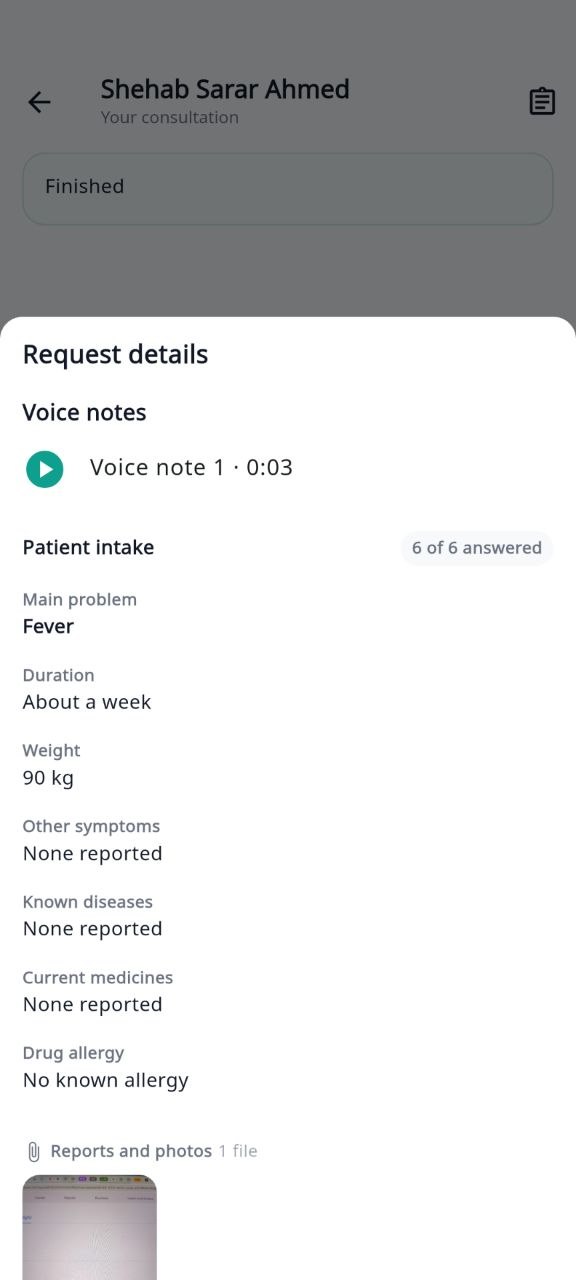
Main problem, duration, medicines, allergies, photos, reports and voice notes arrive with the request, so you start with the full picture.
- 02
More patients, no second chamber
See patients online without rent, staff or equipment. Grow your patient list without growing your costs.
- 03
Requests wait while you're busy
Patients can send requests from 8 am. You answer them in your own chamber hours.
- 04
Your fee, your call
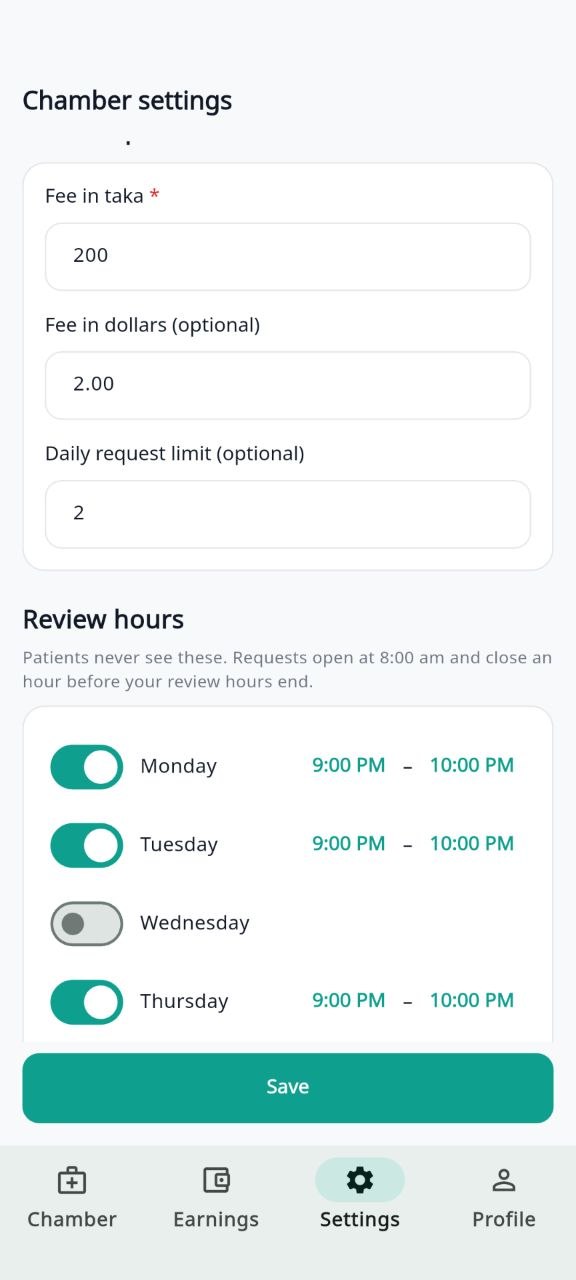
Set your own consultation fee, and a separate dollar fee for patients abroad if you like.
- 05
A daily request limit
Decide how many requests you take in a day. Once you reach it, no more arrive that day.
- 06
The whole country, and abroad
Sylhet, Chattogram or London: patients reach you through one profile.
- 07
Calls and prescriptions when needed
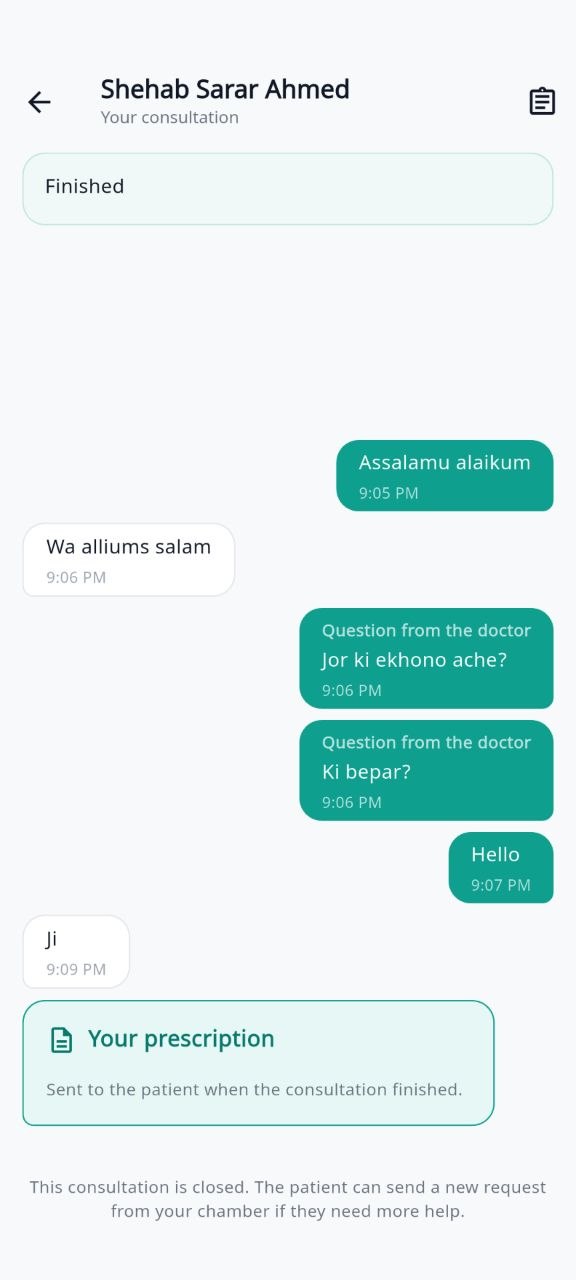
Consult by message, photo and voice note. Start a voice or video call when you judge it necessary, and issue a digital prescription.
- 08
In the app, and soon on the web
See patients in the doctor app at home, at the hospital or travelling, with your earnings in the app too. A web version for your laptop is on the way.
Coming soon
How it works
From request to your first online patient
We set it up with you. You decide your hours, fees and how many patients you take.
- 1
Send your request
Name, WhatsApp and email: that's all we need to start.
- 2
We talk on WhatsApp
We ask for your BM&DC number, degrees and certificates on WhatsApp.
- 3
We verify you
We confirm your registration and qualifications before your profile goes live.
- 4
Set your chamber
Choose your fee, chamber hours and daily limit.
- 5
Start consulting
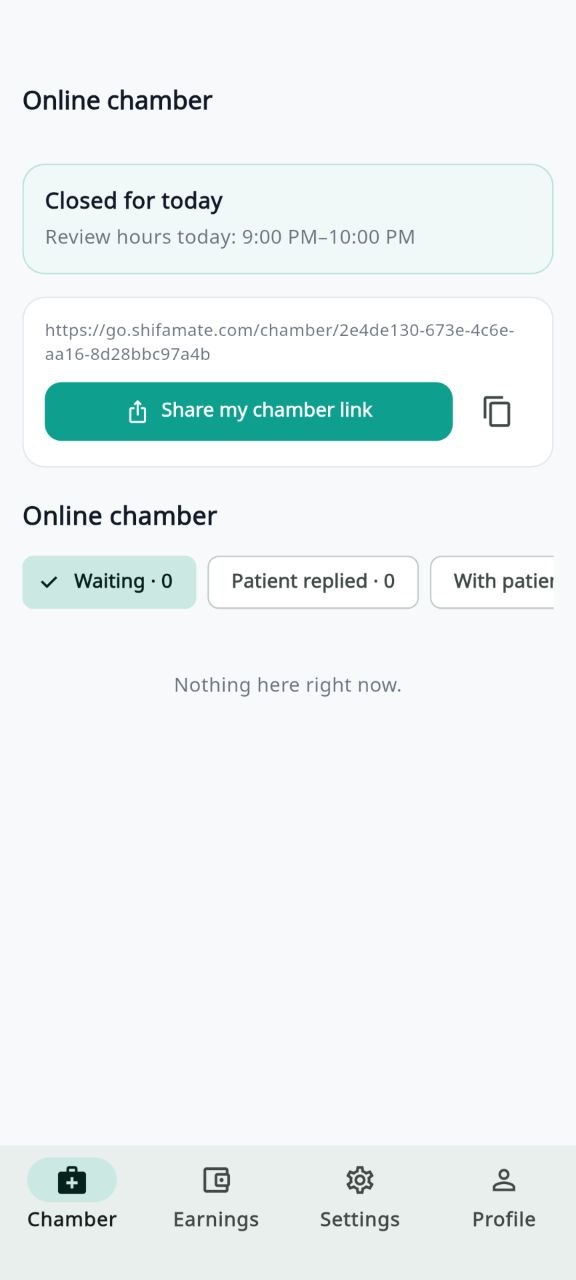
Share your chamber link and answer requests in the app.
Your chamber link and QR code
A link or a scan brings patients to you
Put your chamber link on WhatsApp, Facebook or your prescription pad. Opening it takes the patient straight to your chamber, where they send their request.
Soon you'll also get a QR code to print for your chamber door or reception. Walk-in and emergency patients scan it and send you a request, without queueing or calling.
- You never share your personal number
- Every request arrives with the patient's details
- Walk-in and emergency patients, no queueComing soon
Inside the doctor app
What your chamber looks like
Doctor FAQ
Questions doctors ask
Who can open a virtual chamber?
BM&DC-registered doctors in Bangladesh. We confirm your registration and qualifications before your profile goes live.
How is this different from being a listed doctor?
A listed doctor comes online at set times and sees patients there and then. In a virtual chamber, patients send requests from 8 am and you answer in your own hours. You can do both.
Do I need to leave my hospital or chamber?
No. It works alongside your current practice. It's your responsibility to make sure it doesn't conflict with any employment or chamber agreement.
Do I have to be online all the time?
No. Requests open at 8 am and close an hour before your chamber hours end. You answer during your chamber hours.
How do patients pay, and when am I paid?
Patients see and pay your fee in the app before sending a request. Earnings appear in the app and are settled under your doctor agreement, which we go through during onboarding.
Is there a platform charge?
There's no platform charge for the first month. After that, the applicable charge and settlement terms are agreed with you during onboarding.
Does ShifaMate guarantee patients?
No. We provide the chamber technology and may show your profile, but we don't guarantee any number of patients or earnings. Clinical decisions always stay yours.
More questions? Write to contact@shifamate.com or WhatsApp +1 447 902 2477
Ready to open your virtual chamber?
Leave your details and our onboarding team will reach out to get you set up.